Best Digital Bus Shelter Features Transforming Urban Transit
2026-08-29
Walk past any modern bus stop and you’ll notice something has changed: the old metal bench and static map are giving way to glowing screens, live arrival times, and phone-charging ports. These upgrades aren’t just cosmetic—they’re reshaping how riders experience public transit. Below, we break down the digital bus shelter features making the biggest impact, with zemso offering a closer look at what’s next for smart street furniture.
Arrival boards that update faster than your weather app
The moment a train slips past a timing point, the platform display shifts. It's not waiting for a server to poll, or a push notification to clear a queue. The board is wired into the same pulse as the signalling system, so the delay you see is the delay that actually exists right now—not the version your weather app is still trying to reconcile with a distant data centre.
Under the hood, this speed comes from putting the processing where the tracks are. Edge devices read occupancy sensors directly, and the board renders the next arrival without the round trip through a cloud dashboard. Even a two-second refresh cycle can feel slow when you're deciding whether to sprint for the stairs, but these boards update on sub-second triggers, often faster than the human eye can register a change.
That changes how you move through the station. Instead of glancing between your phone and the overhead display, trying to decide which one is lying, you just look up. The information is already there, already current, and already in sync with the train you're about to catch—or miss.
Touchscreen kiosks that don't demand clean hands
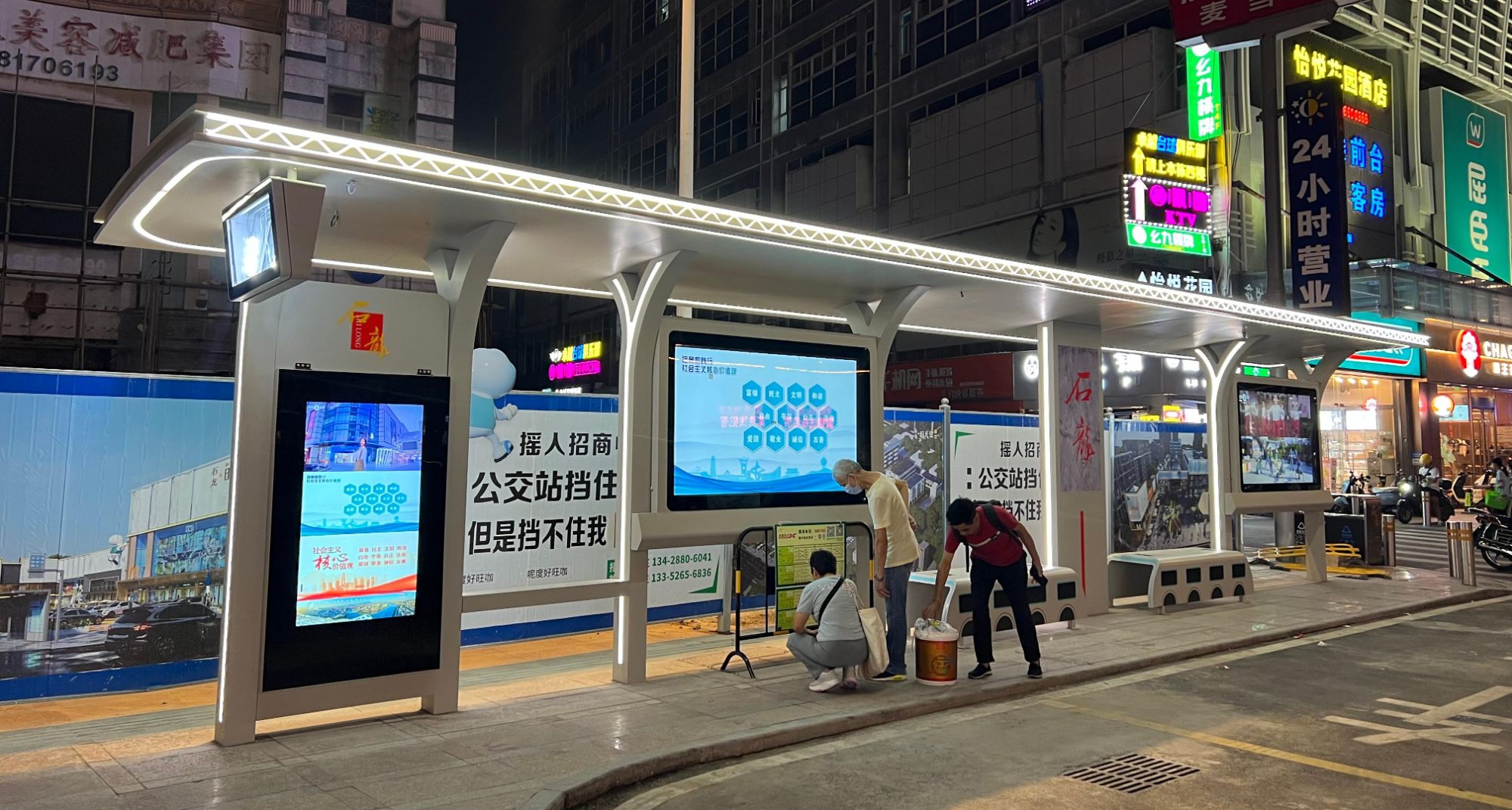
Many public touchscreens accumulate greasy smudges within hours, forcing users to wipe their fingers before interacting. The latest kiosk designs flip this expectation by treating the glass with an oleophobic and antimicrobial coating that causes oils and microbes to bead up and slide off. As a result, a quick tap with unwashed hands leaves no visible trace, and the surface stays hygienic between routine cleanings.
In high-traffic settings like hospital lobbies and fast-casual restaurants, staff once had to sanitize screens every few minutes to maintain a presentable look. These new coatings reduce that burden dramatically, allowing the kiosk to remain clear and responsive even after hundreds of touches from dirty or greasy fingers. Some models also incorporate infrared touch frames, so the actual contact area is minimal, further lowering the need for spot cleaning.
Beyond hygiene, the user experience improves because people stop hesitating before pressing buttons. Instead of searching for hand sanitizer or using a knuckle, they interact naturally, which speeds up transactions and reduces queue frustration. Facility managers also appreciate the lower maintenance costs and longer screen lifespan, since abrasive cleaning chemicals are needed far less often.
Solar roofs that stretch the grid a little further
Rooftop panels do more than trim a household's electric bill. Each array quietly feeds surplus power back into neighborhood feeders, reducing the distance electricity has to travel from distant substations. On hot afternoons when air conditioners strain local transformers, solar roofs can shave peak demand just enough to keep voltage within safe bounds. That extra margin often delays expensive upgrades to wires and poles.
The effect is subtle but cumulative. A cluster of homes with south-facing arrays may turn a once overloaded circuit into a stable micro-source. Grid operators don't always see these small contributions in real time, yet the relief shows up as fewer fault calls and lower line losses. In older suburbs where infrastructure runs close to capacity, distributed solar acts like a pressure valve, letting the existing network serve a few more homes without immediate reinforcement.
There is no single tipping point. Rather, every kilowatt-hour generated at the point of use stretches the grid's reach a little further. Utilities that once treated rooftop solar as an accounting nuisance are starting to map it as an asset, folding private panels into forecasts for feeder loading. The result is a more elastic grid, one that bends under load instead of breaking.
Audio announcements tuned for busy streets
On a crowded city street, a generic announcement quickly becomes background noise. Tuning audio for these environments means prioritizing mid-range frequencies that cut through traffic rumble and chatter, while trimming low-end rumble and overly sharp highs that distort over distance.
Repetition matters as much as volume. A short, clearly articulated phrase repeated at intervals gives pedestrians multiple chances to catch the information without forcing the system to shout. Adding a distinctive two-tone chime before each announcement helps ears lock onto the message even when someone isn't actively listening.
Testing in real conditions reveals that slower pacing and slight pauses between key words drastically improve comprehension at crosswalks and bus stops. The goal isn't louder audio—it's smarter audio that respects the street's existing soundscape while still guiding people safely through it.
Charging stations that rescue dying batteries mid-ride
You're two miles from home when the battery indicator drops to a single blinking bar. Instead of pushing your e-bike uphill, you spot a small solar-paneled kiosk by the curb. Plug in, wait four minutes, and you've got enough juice to finish the trip without breaking a sweat. These rescue points are built for exactly this moment: not for a full charge, but for the emergency top-up that saves your ride, your schedule, and your legs.
Unlike standard charging docks that demand an hour of your time, these mid-ride saviors use high-output capacitors and slim, universal connectors. They read your battery's health in seconds and deliver only what's needed to reach the next station or your destination. Some are tucked into existing bike racks, others glow softly near transit stops, and a few are retrofitted into old parking meters. No apps, no memberships—just a quick tap or a coin slot, and the station hums to life.
The real genius is in the software predicting where batteries tend to die: steep hills, long stretches between neighborhoods, and popular commuter cut-throughs. Station placement follows those patterns, so a rider never feels stranded more than a few blocks from a lifeline. Because the goal isn't to replace home charging—it's to make running out of power a minor inconvenience instead of a walk of shame.
Wheelchair-friendly interfaces that don't feel like an afterthought
Most interfaces get wheelchair access wrong by treating it as a checklist item. Buttons end up at the very top of the screen where they're hardest to reach from a seated position, or the layout demands a pinch gesture that's nearly impossible with limited finger dexterity. If a user has to stretch, tilt their head, or ask someone else to tap a button, the design has already failed.
A better approach puts controls in the lower third of the screen, makes hit areas large enough to trigger with a knuckle or side of the hand, and offers one-tap alternatives for every multi-step action. Support for sip-and-puff switches, eye tracking, or joystick input shouldn't be a hidden setting—it should be part of the default setup flow. The goal is to make the interface feel natural from a chair, not like a workaround bolted on at the end.
Testing with actual wheelchair users shows where assumptions break down. Glare on a tablet mounted to a chair arm can wipe out low-contrast text. A modal dialog that times out after ten seconds punishes someone who needs longer to position a switch. Fixing these details isn't about adding an accessibility mode; it's about designing the core layout so a person never has to think about being in a wheelchair to use it.
FAQ
They replace uncertainty with live data on bus locations, delays, and arrival counts, so riders feel less anxious and can decide whether to wait, walk, or grab a coffee nearby.
Touchscreens allow people to explore routes, see transfer options, and even get walking directions to nearby landmarks, which is especially handy for tourists and irregular riders.
Audio announcements, high-contrast text, tactile buttons, and adjustable screen heights ensure that visually impaired, elderly, and wheelchair users can access the same real-time information as everyone else.
Yes, many units include sensors that display temperature, humidity, air quality index, and pollen levels, giving people a clearer picture of what to expect before they step outside or board.
Solar panels on the roof often generate enough power for screens, lighting, and USB ports, while low-energy LEDs and smart dimming reduce overall consumption and cut operating costs.
Brighter LED lighting, motion-activated illumination, and built-in emergency call buttons make waiting areas more visible and give riders a direct line to transit security or local responders.
They turn a passive wait into productive time, so commuters can top up a dying phone, check work messages, or stream music without draining their data plan.
Modular panels let cities replace broken parts without ripping out the whole structure, and remote updates push new route data or security fixes without sending a technician to every stop.
Conclusion
City bus stops have quietly become some of the most useful pieces of street furniture. The arrival boards refresh with a speed that makes most weather apps feel sluggish, so you always know if you have time to grab a coffee or need to sprint. The touchscreen kiosks are built for real life — they work even when your hands are covered in dirt from a bike chain or sticky from a pastry. And overhead, solar roofs do more than shade you; they feed power back into the shelter and sometimes the grid, making each stop a tiny energy hub.
On a busy street, audio announcements cut through the traffic noise without sounding like a robot shouting into a tin can. Charging stations built into the seats or walls mean a dying phone battery doesn't have to ruin your ride. And wheelchair-friendly interfaces aren't bolted on at the end — they're woven into the design, with reachable screens, tactile buttons, and voice options that work for everyone. These shelters turn a forced pause into a genuinely humane break in the day.
Contact Us
Contact Person: Leo
Email: [email protected]
Tel/WhatsApp: +86 18901905138
Website: https://www.zemsogroup.com/